Every tool call an agent makes still behaves like a person sitting at a terminal. It runs git log and gets back commit hashes, author names, dates, and full commit bodies. Run a test suite and it hands back a progress bar and a line for every test that passed. All of that was built for a human’s eyes, skimming past most of it to the two lines that matter.
An agent doesn’t skim, it reads every word, and you pay for the privilege.
I started running tool calls through RTK this week, and after a couple of thousand uses it’s tracking says 5.1 million tokens have been saved. For week one that’s a saving of $10-$20, depending on the models used. Stretch that across the rest of the year and it could be over $1,000.
Of course, our total AI spend is bigger than tool-call tokens alone, but saving $1,000 a year for one install is good.
What RTK actually does Link to heading
RTK (Rust Token Killer) sits in front of the commands an agent runs, reshaping the output. There’s no LLM reshaping just programmatic rules specific to each tool: it knows what a git log line looks like and what a pytest failure looks like, then drops whatever a human would have skimmed past anyway.
For example:
git logcollapses to hash, author, and subject; no diff stat, no commit body unless needed.pytestrun keeps the actual failures with a trimmed traceback, but collapses everything else.
Install and setup Link to heading
For Claude on Macos:
brew install rtk-ai/tap/rtk
rtk init --global
That’s it.
How it’s used Link to heading
Once it’s set up, your agent will prepend rtk to commands, e.g.:
rtk git status
rtk git log
rtk pytest
rtk lint eslint
That’s the entire interface. My history from this week is full of exactly this: rtk read, rtk ls -la, rtk ruff check ., rtk:toml just backend.... Commands like lint and test are verb-shaped, so they generalise to whichever linter or runner you point them at, not just the small set of tools with bespoke rules built in.
The CLI tools it works on Link to heading
The rules are specific to each tool, which is why the savings run so high. What’s covered to date (Sept 2026):
ls/tree, reported as a tree with file counts instead of one line per entrycat/read, favouring signatures and structure over full file bodiesgrep/rg, long lines truncated, matches grouped by fileast-grep, structural matches grouped by file with overflow cappedgit status,git diff,git log, andgit add/commit/push, each compacted to what you’d actually checkcargo test,npm test,pytest,go test, all reduced to failures, with passing tests collapsed to a countruff checkandsqlfluff lint, grouped by rule and filedocker ps, essential fields onlygit, status, diff, log, add, commit, and push etc.gh, covering common GitHub CLI commands
If you’re getting excited, RTK includes an audit tool that identifies the biggest offenders that arn’t yet covered, so you can write your own rules.
The results Link to heading
My first week’s’ breakdown:
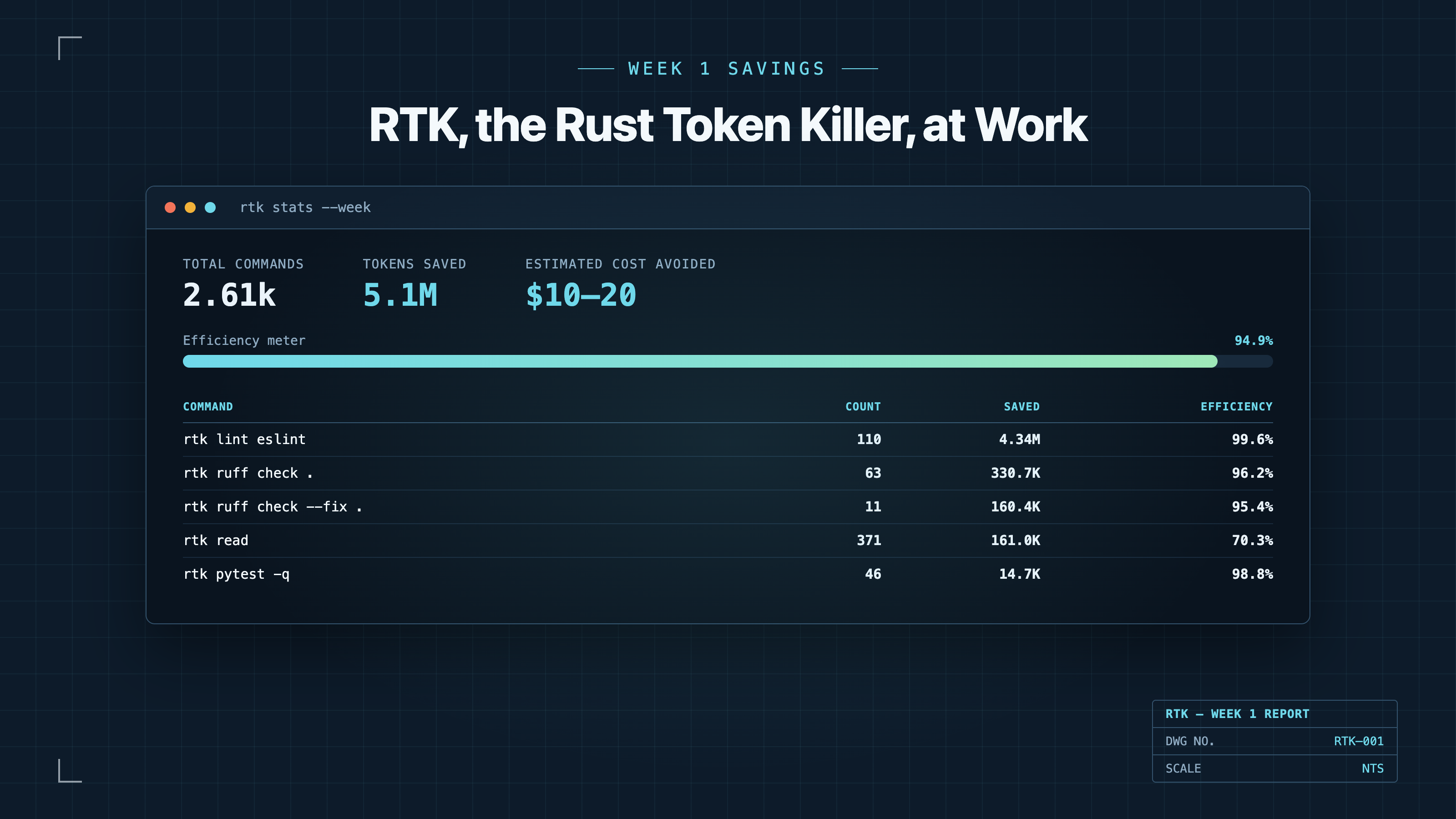
The standout result is linting: 110 calls to rtk lint eslint saved 4.34 million alone! That’s a 99.6% compression efficiency. ruff check and file reads saved most of the rest. Across 2.61 thousand commands, my overall tool token reduction sits at 94.9%, a strange thing to be proud of given it’s output I never wanted to read anyway.
Moreover, it got me thinking about the tools I force the agent to use that aren’t covered, and caused me to turn them into quiet mode, like betterleaks -q now saves ~150 tokens per invocation. Bonus!
The trade-off Link to heading
The catch here is trust. RTK is a proxy: it still runs the real command underneath, so rtk git push really pushes, and rtk docker ps really talks to your Docker daemon. If your agent’s permission setup approves rtk * as a single wildcard, you’ve collapsed your trust decision.
Don’t do it, migrate your approvals to rtk git status or rtk pytest individually, and it’s worth the effort.
Lastly, it costs some CPU time, but built with Rust I’m ok with the per tool call penalty of ~30ms.
Question Link to heading
Do you scope your agent’s tool permissions command by command, or do you trust a wrapper like this with the wildcard? I still explicitly allow and deny permissions to core tools per repo, but auto mode is getting so much better I wonder how much longer that’ll be useful.